



Bijoy Bayanno: a simple and powerful tool for bengali typing
Bijoy Bayanno is a Bengali typing software for Windows, also known as Bijoy 52. It lets you write Bangla using both old and new text systems. The software is made for people who need accurate and professional Bengali typing on their computers. Many offices, schools, publishing houses, and government departments use it.
This software is great for keyboard-based Bangla input. It doesn't use phonetic typing. Instead, it follows the familiar Bijoy typing style. Many experienced Bangla typists already know this method.
Supports both classic and modern bangla encoding standards
Bijoy Bayanno works with two important encoding systems. These are ASCII and Unicode. Both types are still important for Bangla computing.
ASCII encoding is common in older documents and printing systems. Unicode is the modern standard. It works better with new software and websites. Bijoy Bayanno lets you use both. This makes it useful for old files and new projects.
Bijoy keyboard layout with smooth typing performance
Bijoy Bayanno uses the traditional Bijoy keyboard layout. This works in both ASCII and Unicode modes. You don't need to learn a new keyboard when you switch between them. This makes daily typing much easier.
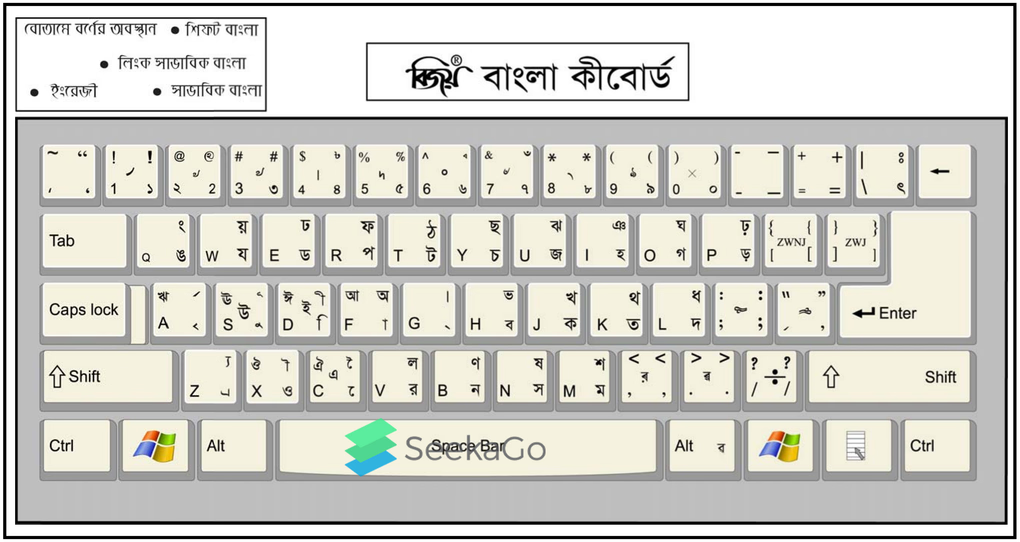
Typing performance is stable and fast. The software handles long documents without slowing down. It works well even on older Windows computers. It doesn't use much system memory either.
Works across multiple Windows versions
The software supports Windows XP, Vista, Windows 7, Windows 8, Windows 10 and Windows 11. It works on both 32-bit and 64-bit systems. Installation is simple and does not require advanced technical knowledge.
Bijoy Bayanno is designed only for Windows. There is no official version for macOS, Linux, or mobile devices. Users who need cross-platform typing may find this limiting.
Compatible with many bangla fonts and document formats
The software includes the Bangla fonts you need. You don't have to install them separately. This means your text displays properly in different programs.
Bijoy Bayanno works well with common file types. This includes Word documents, plain text files, and desktop publishing software. You can use it to write letters, reports, articles, books, and official documents.
Works smoothly with most Windows applications
One reason Bijoy Bayanno is still popular today is its wide compatibility. After installation, it works with almost any Windows program that allows text input. You can use it in office software, publishing tools, design apps, databases, and even online forms.

The software stays simple and focused. It does not include a separate editor or file manager. Instead, it concentrates on one task only typing Bengali correctly wherever you are working. This makes the experience clean and free from distractions.
Bijoy Bayanno supports both Unicode Bengali fonts and older legacy encodings. This is very helpful for offices that still use older documents while slowly moving to Unicode systems.
Designed for smooth daily document work
Bijoy Bayanno runs quietly in the background and uses very little system resources. It becomes active only when you switch to Bengali typing. Because of this, your computer stays fast during normal use. Even older Windows PCs can run it without problems.
Different versions of Bijoy Bayanno support different Windows editions, so choosing the right version is important. Once installed correctly, Bengali text appears clear and well-formatted. Joint letters display properly, spacing looks natural, and fonts remain readable at all sizes.
This reliability is important for professional work. Users do not have to deal with broken letters or messy layouts, which are common issues with less reliable typing tools.
How people use Bijoy Bayanno in real life
Bijoy Bayanno is mainly used for fast and accurate Bengali typing. Journalists use it daily to meet tight deadlines. Government offices also rely on it for official letters, reports, and administrative documents.
Educational institutions use Bijoy Bayanno to prepare textbooks, exam questions, and study materials. The consistent output keeps printed documents clear and professional.
Online content creators also find it useful. Whether writing blog posts, updating social media, or managing websites in Bangla, Bijoy Bayanno works smoothly in web browsers and content systems. This saves time and reduces typing errors.
Pros
- + Supports both ASCII and Unicode Bengali typing
- + Compatible with old and modern Windows versions
- + Includes built-in fonts and conversion tools
- + Works fully offline with strong privacy
Cons
- – Learning curve for beginners
- – Paid license required for full access


Reliable software for professional document formatting. Installation was quick, though the interface feels a bit dated.
The keyboard shortcuts make typing in Bengali so much faster. Essential for my daily work.
Good functionality but sometimes crashes on Windows 11. Useful for legacy font support.
Best Bengali typing tool for Windows. Very easy to switch between English and Bijoy layouts.
Solid performance for typing letters and documents. It gets the job done without any complex setup.